The module designed to help you organize your events and meetings and say goodbye to paper agendas.
What is the Odoo Calendar for?
The Odoo calendar allows you to view by day, week, and month, where you can create events. It allows you to create activities and events, keeping a record of them. You can synchronize with Google Calendar and Outlook, thus sharing data with these tools.
Features
On the main page of the Calendar module, you can have a view of the calendar showing all existing events. It also allows you to create a new event by clicking the buttonNew,in the upper left corner of the screen or by clicking.
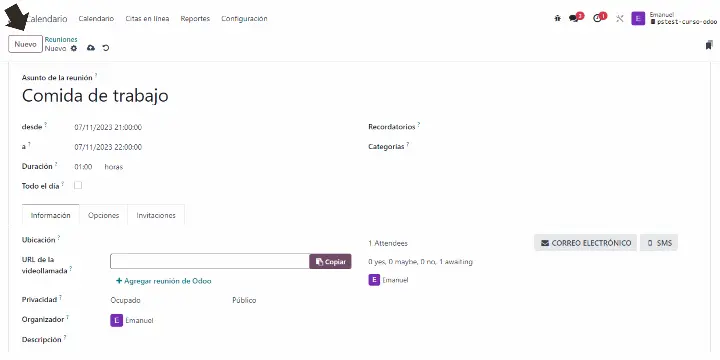

Information
- Location:To register the place where the meeting will take place.
- Video call URL: In case it is a meeting on Google Meet or Teams, we can index the link here for direct access.
- Privacy:This allows the event to be public, private, or only visible to certain users.
- Organizer:This is used to establish who is responsible for the activity. By default, the user who created it will be set as the organizer.
- Description:To add a description about the created event.
Events
Speakers from around the world will join our experts to give inspiring talks on various topics. Stay updated on the latest technologies and business management trends.

Invitations
Their purpose is to add attendees, email, and send all the invitations.
We complete all the necessary fields and the event or meeting will be registered in the system. The administrator will be able to seetheir own calendar and that of all employees, to keep track of their scheduled activities, and they will also be able to schedule them for the employees themselves.