
CRM Odoo ERP
A CRM is a technological tool aimed at managing the relationships a company has with its leads (potential customers) and current customers. This is where its name comes from (Customer Relationship Management) which in Spanish meansCustomer relationship management.
It is a great ally for your company, as it stores important information about your leads in a single database: their name, email address, phone number, availability hours, demographic information, among other things. It also maintains a historical tracking structure of customers from their first contact and a record of all actions that have occurred during their attention.
It is very helpful in the sales and marketing area of your company, as it allows you to obtain a complete view of all this data to make informed decisions such as optimizing sales processes and implementing more effective and better-targeted marketing campaigns.

Is it an option for all companies?
- You will find all the information in one place.
- It allows you to understand the customer journey within the company.
- Thanks to the data you have here, you can deduce which campaigns and strategies are most suitable for your company.
- It facilitates the visualization of customers, as it allows you to see where they are in the sales process.
Absolutely! As long as you have your target market, products, and pre-sale and post-sale phases well structured, a CRM will significantly help you and offers many advantages:
4 simple stepsto implement a CRM in your company
You need to take into account certain characteristics of your company and clearly define some points that will help you better understand the process.
1. Structure and define the pre-sales and post-sales phases of your company.
Each company has its own pre-sales and post-sales phases, which depend on the type of product or service offered, and even the type of market they are targeting.You can start by analyzing the customers you already have and outlining a guide on how they came to your company, for example:
What actions must a person take for them to start receiving follow-up from the sales department? If the person is interested in your product or service, are they considered a customer until a quote is generated, or is there another step before that? Once the purchase is made, what actions did you take to retain them and encourage them to buy from you again?
2. Clearly define the products and services you offer and their descriptions.
- What country do you sell it to?
- What type of customers?
- Are your products or services grouped by categories?
3. Define very specifically how your sales team is structured.
Do they all sell the same thing? Will you divide it by regions? Is your target market located in one place? It is important to have a well-defined team and the responsibilities each member will have; this step is crucial as it will help with the organization and proper functioning of the CRM.
4. Define what characteristics your lead must have to belong to each phase you outlined.
How do you know if you need a CRM?
- Your sales area is not unified and in one place.
- You can't quickly find customer data.
- The data of your leads is not properly secured.
- The customer experience is not good.
- You are not effectively following up on your leads.
A special feature of this CRM compared to those available in the market is that Odoo has multiple modules in one software that will help you be more efficient in managing your business. All modules in Odoo can be automatically integrated, allowing you to add applications as you need them, for example: eCommerce, website, email marketing, accounting, invoicing, among many others.
Another quality you can take full advantage of in Odoo's CRM is that it allows you to know which platform your customers come from, whether it's from the website, a social media campaign, email, or even if they were directly prospected. This provides valuable information that will facilitate your decision-making.
All applications share a very similar and easy-to-use interface, which is why migrating all business management to Odoo is so simple.
Sell faster
Modern user interface
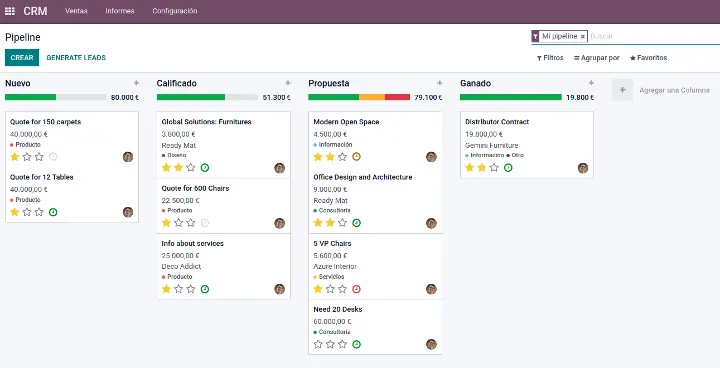
An intuitive user interface designed for sales. A dashboard for a better overall view of sales activities. Useful tips and best practices for setting up and using your CRM.
CRM on your mobile
Sell on the go with Odoo's mobile user interface.
Reduce data entry
Automatically create leads from emails or VoIP calls. Send quotes with just a few clicks, manage your flow with the drag-and-drop feature, etc.
Large screen view
Optimized view for large screens, with the opportunity form on the left and a scrollable chatter on the right.
Leads
Lead enrichment
Create campaigns to automatically send emails tailored to the lead's segment and activities.
Lead scoring
Score your leads based on explicit or implicit criteria (page views, location, time). Define different actions based on lead score and team assignment rules. Decide what total score deserves to become an opportunity.
Import leads
Easily import lead files with Odoo's column matching tool.
Online acquisition
Get more than 30 marketing applications to boost lead generation from your website: search engine optimization tool, form builder, etc.
GeoIP
Automatically detect countries, states, and cities of leads from your visitor's IP address.
Live chat
Enable Odoo's Live Chat on your website to talk to visitors and convert them into leads. Define rules by key countries or pages.
Deduplication
Ensure that lead proposals merge when a lead becomes an opportunity. Automatically create contacts based on leads.
Assignment rules
Define your own rules for assigning leads to the sales team or the right salesperson based on quotas and segments.
Calls to action
Optimize lead acquisition with Odoo's five calls to action and the A/B testing tool.
URL trackers
Track the source of leads using UTM trackers across all your marketing campaigns.
Opportunities
Activity and call management
Organize a sequence of activities by opportunity. Plan activities. Log each activity in the opportunity chatter immediately with predefined actions. Track, record, and analyze your team's activities.
Flow management
Get a clear overview of the opportunity flow. Work faster with the drag-and-drop interface. Set specific stages for each sales team. Ability to create sub-stages to better organize processes. Automatically archive lost opportunities. Manually archive other opportunities. "Lost" is no longer a stage, but a separate field, allowing for more powerful flow analysis, e.g., loss rate by stage.
Customize stages
Customize your flow by adding a description to the stages.
Schedule meetings
Schedule meetings from a customer opportunity. Sync with mobile phones and Google Calendar.
Plan next actions
Plan next actions and schedule your daily work according to the most important opportunities and tasks.
360° visibility
Get all the correct information about the opportunity: pages visited on your website, emails, meetings, next actions, previous orders, etc.
Log calls
Log calls or start VoIP calls with just a few clicks. Odoo automatically suggests rescheduling the next action after the call.
Reasons for losses
Analyze the reasons for losses in your opportunities to improve your sales effectiveness.
Revised configuration options
Activate leads if necessary.
Customers
Address directory
You have access to a clear directory that is shared among all your salespeople.
Customer preferences
Easily set customer preferences: language, shipping method, financial data, etc.
Multiple addresses
Have multiple addresses and contacts for a single company.
Complete history
Attach the complete activity history to a customer: opportunities, orders, invoices, etc.
Efficient communication
Email templates
Create email templates for the most common communications with your customers or opportunities.
Email portals
All email communications are automatically attached to the correct opportunity. Automatically create new leads based on incoming emails.
VoIP
Create a call queue for customers or opportunities, call from the browser automatically or manually. Automatically log calls, open the customer form, automate next actions, etc. Reschedule or send an email for missed calls. A pop-up is automatically generated to receive calls. Integrated with Asterisk server v13.2 VOIP.
Custom alerts
Track key opportunities with just one click and receive alerts based on relevant activities.
Reports
Dashboard
Use predefined dashboards or create your own with the advanced reporting engine. Share filters with the team.
Opportunity analysis
Analyze the opportunities in your product flow with advanced filters, grouping, breakdowns, etc.
Cohort analysis
Keep track of the evolution of your KPIs over time and detect trends.
Lead analysis
Get statistics on your lead sources to evaluate the ROI of your marketing campaigns.
CRM dashboard
View your sales teams' KPIs at a glance.
Integrations

Sales
Convert opportunities into quotes with just a few clicks. Get a complete view of the customer's history.More information

Inventory
Get information about product availability in the quote. Activate delivery orders and check the delivery status from the order. More information
Powerful API
Make the Odoo CRM application do almost anything with the API: connect other software, automatic lead creation, etc.
Google Documents
Use the integration with Google Documents to link any document to your opportunities: qualification forms, advanced pricing tables...
All sales channels
Integrate all sales channels: Online sales (E-commerce), internal sales (CRM) and in-store (Point of Sale).
Marketing applications
Drive lead acquisition and enrich them with Odoo's marketing applications: Email marketing, Events, URL trackers, landing pages, etc.
Ultimately, Odoo's CRM is one of the most powerful tools to increase a company's success rates,it allowsyou to track your potential customers, close opportunities, obtain forecasts and more accurate data. Smoothly assisting your sales, marketing processes, and more.